
THE DIGITAL REPOSITORY FOR THE BLACK EXPERIENCE
Search Results
Setting Up Your Institutionmaker Account
After becoming an Institutional member (The HistoryMakers’ subscribing institution), make sure to set up the following items.
-
- ADD THE HISTORYMAKERS EZPROXY STANZA TO YOUR EZPROXY SERVER:
-
- URL
- https://da.thehistorymakers.org
- HJ
- marc.thehistorymakers.org
- HJ
- da.thehistorymakers.org
- DJ
- thehistorymakers.org
-
- DOWNLOAD AND INGEST THE HISTORYMAKERS MARC RECORDS INTO OCLC’S COLLECTION MANAGER
-
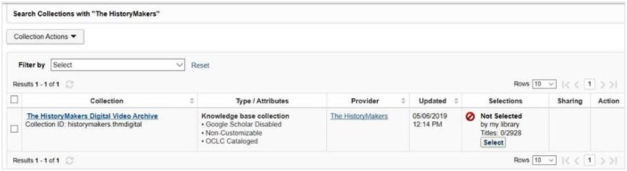
As new interviews are added to The HistoryMakers Digital Archive, you will provided with additional accompanying MARC Records.
-
- SET UP YOUR IP REGISTRY ACCOUNT
-
Register your IP addresses with IP Registry at www.theIPregistry.org. Once this is done, all of your IP addresses will be updated automatically via IP Registry, not with The HistoryMakers. This will provide you with a more seamless process.
-
- COLLECT AND REVIEW YOUR COUNTERCOMPLIANT DATA
-
The HistoryMakers will also provide usage statistics to our customers that are now compliant with the COUNTER Code of Practice, Release 5. We will send you one invitation to register for The HistoryMakers Digital Archive COUNTERcomplaint report after your complete your test via playing several clips.
-
- FOR ANY ISSUES OR QUESTIONS REGARDING THE HISTORYMAKERS DIGITAL ARCHIVE, PLEASE CONTACT:
-
For Digital Archive support such as technical issues, content, and training
Zhu Sun – zs@thehistorymakers.org -
MARC Records & Delivery
OCLC – support@oclc.org